
On April 02, 2025, Oracle released the Vulnerability Detection service as part of Database Management in OCI. It empowers DBAs, architects, and security teams to detect and mitigate risks before they become threats. In this post, let us walk through the end-to-end setup of Vulnerability Detection, how to run assessments, and interpret the findings.
But wait! What if you are already using Vulnerability Framework in OEM or, already leveraging the patch recommendations available on the OCI console in case of ExaCC or ExaCS? I had these exact questions pop-up in my mind so, I will go through these details as well as what makes sense and where. Yes, I know ExaCS is now “Exadata Database Service on Dedicated Infrastructure”. 😊
What is Vulnerability Detection?
It is a part of the “Database Management service” offered by Oracle Cloud Infrastructure. Its job is simple: it checks your Oracle Databases for any known vulnerabilities by looking at:
- Database version
- Applied patches, and
- Configuration settings
The assessment results are then compared against the Oracle Critical Patch Update (CPU) advisories and Oracle recommended best practices.
Step-by-Step Implementation
Prerequisites
Note: If you have discovered a database as part of Stack Monitoring, these steps are already performed and you should see the discovered database under “Managed Databases” with Status “Connected”. You should directly go to “Enable Vulnerability Detection”.
To turn on Vulnerability Detection:
- Management Agent installation must be completed for external databases. (I will cover this in detail as part of the Stack Monitoring blogpost)
- Register external database.
- Connect the external database.
- Enable Database Management for the database.
- Ensure your user has required IAM permissions, including:
DATABASE_MANAGEMENT_WORK_REQUEST_READDATABASE_MANAGEMENT_VULNERABILITY_ASSESSMENT_EXECUTE
Register an External Database:
- Go to OCI Console → Observability & Management → Database Management → Administration.
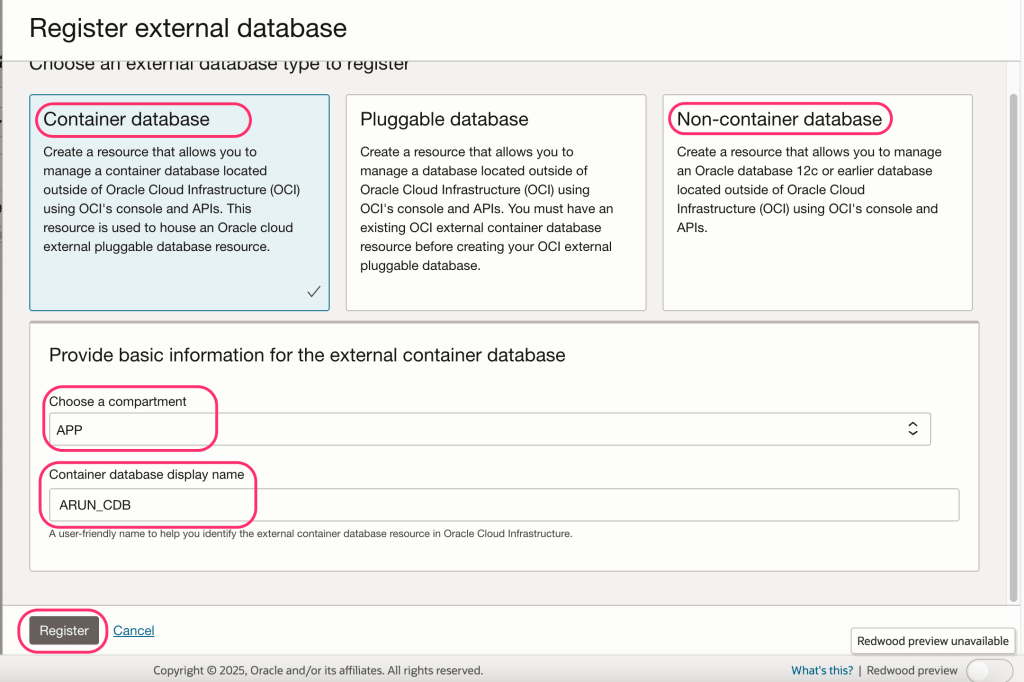
- Click on “Register External Database”.
- Click on Container/ Non-container database
- Choose the right compartment, provide a user-friendly display name and click on Register.
- Once registered, create a database connection handle and connect the Oracle database.
Enable Database Management:
- Go to OCI Console → Oracle Databases.
- Select your Autonomous or External Database.
- Under Resources, click Database Management.
- Click Enable and choose the license type.
Note: Autonomous Databases have this enabled by default.
Enable Vulnerability Detection:
- Go to OCI Console → Observability & Management → Database Management → Administration → Managed Databases.
- Select your Autonomous or External Database.
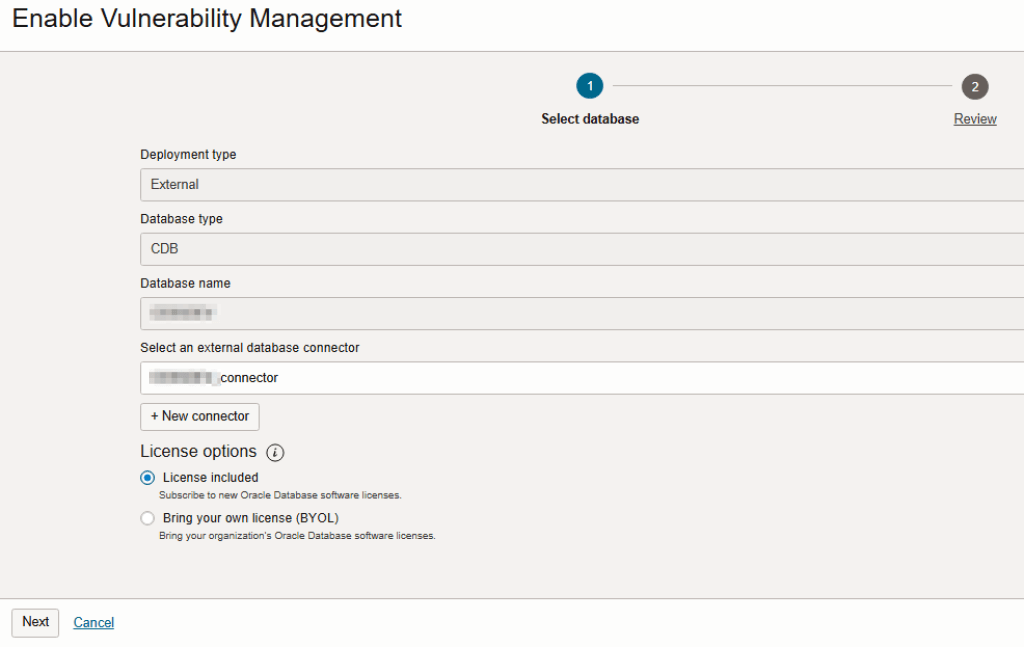
- Click on “Enable” link under Vulnerability Management.
- On the next screen, select the database connector, choose the license option (License included in most cases) and click on Next.
- Once you review the settings, click on Submit.
Note: In case of a container database, this option is only available for a CDB and not PDBs.
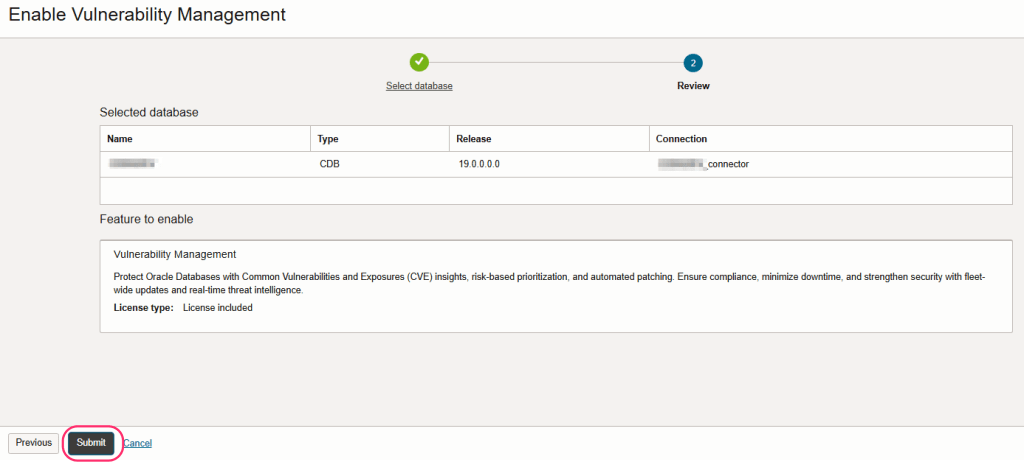
And, that’s it! Once the Vulnerability Management is enabled, the vulnerability statistics are collected every 24 hours via the Management Agent. You however, have an option to run up to 3 On-Demand scans after 30-minutes or so, in a 24-hour period.
Interpreting Results:
Once either the on-demand or scheduled scan is complete:
- Go to Vulnerability Detection tab.
- Click on the latest assessment.
You’ll see:
- High, Medium, and Low risk findings.
- Details of unapplied patches, unsupported database versions, and misconfigurations.
Each finding includes:
- Description
- CVE Identifier (if applicable)
- Recommendation (patch link or config advice)
Notifications and Automation
You can use OCI Events + Notifications to receive alerts when:
- A new vulnerability is found
- Assessments are complete or
- A schedule fails
How is this different from the Patch Recommendations in ExaCC or ExaCS?
The Vulnerability Detection service in OCI Database Management and the Patch Recommendation for Exadata Cloud@Customer (ExaCC) and Exadata Database Service on Dedicated Infrastructure (ExaCS) both have an impact on patching and security, but they are complementary tools with different scopes and workflows.
Here’s a breakdown of how they differ:
Purpose and Scope
| Feature | Vulnerability Detection (OCI Database Management) | Patch Recommendations (ExaCC/ExaCS) |
|---|---|---|
| Primary Goal | Detect vulnerabilities using Oracle CPUs and security best practices | Recommend and plan database/home patches for ExaCC/ExaCS targets |
| Scope | Assesses DB version, patch level, config for CVEs and Oracle security risks | Evaluates target environment to generate patching strategy |
| Target | Autonomous DB, External DBs, and DBCS (VM/BM) | Specifically for Exadata-based databases (ExaCC/ExaCS) |
| Type of Detection | Security-focused (CVEs, misconfigurations) | Lifecycle and compliance-based (patch drift, PSU updates) |
Technology and Data Sources
Vulnerability Detection pulls data from:
- Oracle CVE bulletins
- Oracle best practice baselines
- DB configuration (via agent/telemetry)
Patch Recommendations pulls data from:
- Fleet Patching and Provisioning (FPP) or DB Homes
- Patch Advisor tooling on the Exadata infrastructure
- Lifecycle metadata for patch planning and staging
Update Frequency
| Feature | Update Frequency |
|---|---|
| Vulnerability Detection | Continuously updated with new CVEs and advisories; assessments can be run on-demand or scheduled |
| Patch Recommendations | Based on Oracle’s quarterly Critical Patch Updates (CPUs); updates per patch cycle or DB home |
Actions and Automation
| Capability | Vulnerability Detection | Patch Recommendation |
|---|---|---|
| View CVEs & misconfigs | Yes | No |
| Export assessment | Yes (CSV/JSON) | No |
| Direct patch application | No (manual patching required) | Yes (can trigger patch job) |
| Notification & Integration | Yes (via OCI Events & Notifications) | Yes (part of patch job flow) |
When to Use What?
| Scenario | Use This |
|---|---|
| You need to detect and analyze CVEs and config risks in various database types | Vulnerability Detection |
| You want to automatically apply patches to ExaCC/ExaCS DBs and Homes | Patch Recommendations |
| You want security and compliance posture for audit reporting | Vulnerability Detection |
| You want to reduce patch drift across multiple Exadata environments | Patch Recommendations |
How is it different from OEM Compliance Report/ Framework?
OCI Vulnerability Detection and OEM Compliance Report, both helps in assessing the database posture, however they are different use-cases.
| Feature | OCI Vulnerability Detection | OEM Compliance Framework |
|---|---|---|
| Scope | Focused on CVEs, security misconfigurations, and patch advisories | Broader compliance across security, configuration, and custom policies |
| Target Environment | Databases managed via OCI (Autonomous, External, DBCS) | On-premises and hybrid Oracle environments managed via OEM |
| Data Sources | Oracle CVE bulletins, database patch level, and best practices | Oracle’s built-in compliance standards + user-defined checks |
| Granularity | Security-focused findings (e.g., missing CPU, listener config issues) | Deep configuration checks across OS, DB, middleware layers |
| Customization | Limited (mostly standardized scan) | Highly customizable rules and standards via compliance standards |
| Execution | Automated or on-demand from OCI Console | Scheduled or on-demand via OEM UI or jobs |
| Automation | Integrates with OCI Notifications & Events | Integrates with corrective actions, EM job system |
| Output Format | Risk categories, CVE links, patch info | Pass/fail status, severity, policy descriptions |
| Ideal For | Cloud-first security teams and DBAs on OCI | Enterprise IT, audit teams, regulated environments (e.g., SOX, HIPAA) |
Conclusion
OCI’s Vulnerability Detection is new tool to gain a proactive, automated, and Oracle-recommended approach for strengthening databases. Use it alone or in a combination with OEM Compliance Report/ Framework and/ or Patch Recommendations. Hope it helps! Stay tuned for more…
Discover more from IT-Noesis
Subscribe to get the latest posts sent to your email.

 IT-Noesis